You just arrived in Japan and you’re ready to explore. But when it’s time to pay for your train ticket, coffee, or a quick snack—uh-oh! Your credit card doesn’t work, and you’re not sure which mobile payment to use.
It’s frustrating, right? You don’t want to carry a pile of coins, and you don’t want to hold up the line at the register. You’ve heard about “NFC” mobile payments, but… what does that even mean? Are they safe? Which ones work in Japan?
Good news—this guide is your answer. We’ll walk you through NFC mobile payments in the simplest way possible. You’ll learn what NFC means, how it works, the best payment types for tourists, and where you can use them.
I still remember fumbling at a Tokyo vending machine, holding up locals while figuring out how to pay. Now, with the right NFC setup, I breeze through shops, trains, and cafes with just one tap.
Whether you use an iPhone with Apple Pay, a Suica card in your Android wallet, or a foreign Visa card that supports contactless, Japan makes it easy—as long as you know the rules.
So let’s get started! In the next sections, we’ll break it all down step by step, in clear English—even a 10-year-old could understand. Say goodbye to payment panic, and hello to tap-and-go freedom in Japan.
What Is NFC? A Simple Guide for Beginners

The Meaning of NFC and How It Works
Let’s start with the basics: NFC stands for Near Field Communication. That might sound complicated, but it’s actually very easy to understand. NFC is a special kind of technology that lets two devices talk to each other when they are very close—usually within 4 centimeters. It’s like a magic handshake between two machines!
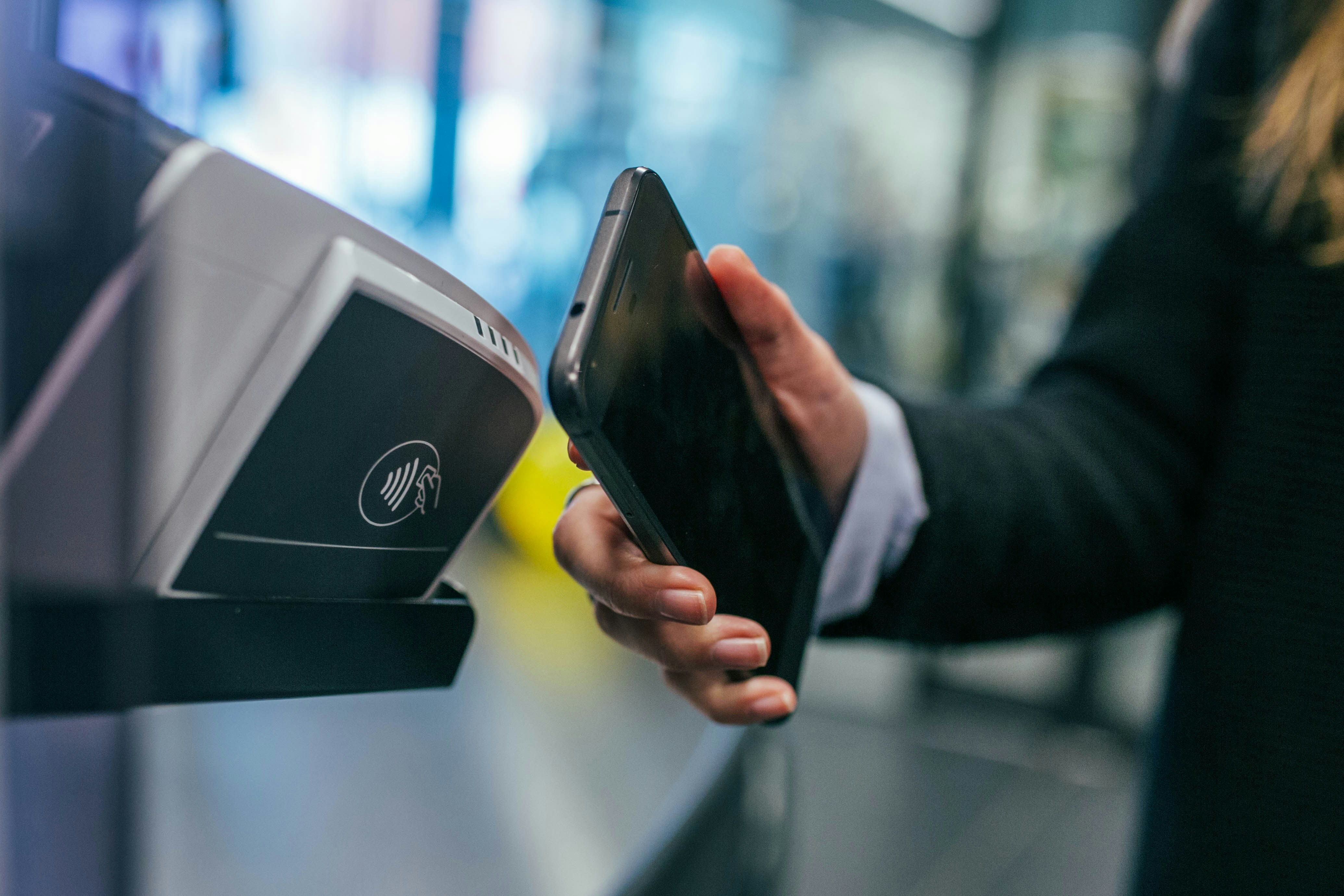
Here’s how it works. Imagine you have a phone that can do NFC. Inside that phone is a tiny chip. This chip can send and receive small bits of information. When you bring your phone close to another device with an NFC chip—like a card reader at a store—they connect. That’s it! The connection happens quickly and safely.
You don’t need to touch the machines together. Just holding your phone close to the reader is enough. Most of the time, it takes less than a second. That’s why many people say it feels like magic.
Your phone’s NFC chip can send a signal to pay for something, unlock a door, or even share contact info with a friend. Some train stations in Japan let you tap your phone to ride the train. It’s quick, smooth, and you don’t even need to open an app. It’s like your phone becomes your wallet and your key.
The Difference Between NFC and QR Code Payments
Now you might be wondering, “Is NFC the same as a QR code?” Great question!
Both NFC and QR codes help you pay or share information. But they work differently. A QR code is a picture made of black and white squares. You use your phone’s camera to scan it. Then, the phone reads the picture and goes to a website or opens a payment app.
With NFC, there’s no need to scan anything. You just tap your phone. The payment goes through in one smooth move. It feels faster and easier.
Here are the main differences:
| Feature | NFC Tap Pay | QR Code Pay |
|---|---|---|
| Needs Camera? | No | Yes |
| Speed | Instant (less than 1s) | Slower (few seconds) |
| Hands Needed? | One hand is enough | Often need two hands |
| Works Offline? | Sometimes | Needs Internet |
So why do people still use QR codes? One reason is that QR codes are cheaper for shops to set up. You don’t need a fancy machine—just a printed sticker. That’s why you see QR codes more often at small shops or food stalls.
But NFC is growing fast because it’s so smooth and safe. Many modern phones and stores now support NFC. Big chains like Starbucks, FamilyMart, and Lawson in Japan all accept NFC-based payments like Apple Pay or Google Pay.
Why NFC Is Popular for Mobile Payments
Now let’s talk about why NFC is so popular. People love NFC for four big reasons: Speed, Simplicity, Safety, and Style.
1. Speed: With NFC, there’s no need to type in a number or count coins. You just hold your phone up to the machine. That’s it. Perfect for busy people!
2. Simplicity: No need to open an app. Just unlock your phone (or sometimes not even that), and tap. Even kids or elderly people find it easy once they try it.
3. Safety: NFC uses short-range communication. That means it only works when the two devices are super close. Plus, your phone usually needs a fingerprint, face scan, or password to approve the payment. That makes NFC hard to trick.
4. Style: Let’s face it—tapping your phone to pay feels cool! It’s smooth, modern, and looks high-tech. You don’t need to fumble for cash or worry about coins.
In Japan, NFC is also great for visitors. If you have a phone with Apple Pay, Google Pay, or Samsung Pay, you can link a credit card or a local IC card like Suica or PASMO. Then, you can ride the train, buy drinks, or grab lunch—all with one tap. No Japanese yen? No problem!
NFC is especially helpful during COVID-19 times, too. It’s contactless, which means you don’t have to touch shared machines or hand over cash. That helps keep things cleaner and safer.
So, to summarize:
NFC is a fast, simple, and safe way to pay or share data by tapping your phone.
It works with just a tiny chip inside your phone and is more convenient than QR codes.
For example, at a Japanese convenience store, you just tap your phone to buy a snack—no cash, no card-swiping, no waiting.
If you want to pay like a local in Japan, learning NFC is one smart move. It’s like having a magic wallet in your pocket.
5 Types of NFC Mobile Payments You Should Know
When traveling or living in a modern city, using your phone to pay for things is becoming normal. NFC (Near Field Communication) makes this super easy. But did you know there are different types of NFC mobile payments? In this guide, we will explain five popular kinds: Apple Pay, Google Pay, Samsung Pay, Suica and PASMO Mobile, and contactless credit cards. Each one has special features, and knowing which to use can save you time and stress.
Apple Pay: iPhone Users’ Favorite
Apple Pay is the top choice for iPhone users when paying with NFC.
It’s already built into every iPhone. That means you don’t have to download anything extra. You just add your credit or debit card to the Wallet app and you’re ready to go. Apple Pay works in stores, vending machines, buses, trains, and even online. It’s fast and safe because it uses Face ID or a passcode.
Let’s say you’re in Tokyo, buying lunch at a convenience store. You tap your iPhone near the reader, and—beep!—you’re done. It feels like magic.
So if you use an iPhone, Apple Pay is probably the easiest and most secure way to use NFC payments.
Google Pay: Android and Beyond
Google Pay is perfect for people with Android phones.
Like Apple Pay, it lets you store your credit or debit card digitally. But it also works well with many services outside Google, like loyalty cards and train tickets. Google Pay is flexible and accepted in many countries and stores.
You’re visiting Kyoto and want to ride the subway. Just tap your Android phone at the gate using Google Pay linked with your Suica card, and you’re through—no paper tickets needed.
Google Pay is a powerful NFC tool for Android users, especially for travel and shopping in Japan.
Samsung Pay: For Galaxy Users
Samsung Pay is the go-to NFC option for Samsung Galaxy devices.
While it works much like Google Pay, Samsung Pay has an extra feature—it can also use MST (Magnetic Secure Transmission), which works with older card readers. This gives Samsung users more options when NFC isn’t available.
Imagine you’re in a small cafe in Osaka. The shop doesn’t support NFC but has an old-style credit card reader. Samsung Pay can still help you pay without cash using MST mode.
For Galaxy phone owners, Samsung Pay is both advanced and flexible, covering more places than just NFC-friendly shops.
Suica and PASMO Mobile: Great for Transport
Suica and PASMO Mobile are smart travel cards you can use right on your phone.
These apps work great for public transport in Japan. You can add money to your card with Apple Pay or Google Pay. Just hold your phone near the gate when entering the train. No need to buy paper tickets or stand in line.
You’re rushing to catch a train from Shinjuku to Shibuya. With Suica on your phone, just tap and go. It saves time and stress.
For tourists and locals alike, Suica and PASMO Mobile are the smartest way to travel around Japan using NFC.
Credit Card-Based Contactless Payments (Visa, Mastercard)
Many modern credit cards now come with NFC, so you don’t even need your phone.
These cards have a tiny chip that lets you pay by just tapping the card on the reader. No PIN, no swipe. It’s great for quick buys like coffee, groceries, or a train ticket. You’ll see a small icon that looks like a Wi-Fi signal on the card—that means it supports contactless payment.
You’re in Kyoto buying a bottle of water. You tap your Visa card on the reader, hear a beep, and it’s paid. Done in seconds.
Contactless cards are fast, easy, and great when you want to leave your phone in your pocket.
No matter which one you choose, NFC payments save time, reduce stress, and are safer than using cash. If you plan to visit Japan or already live there, learning how these tools work will make your life a lot smoother. Try them out and see which one fits your needs best.
Where Can You Use NFC Mobile Payments in Japan?
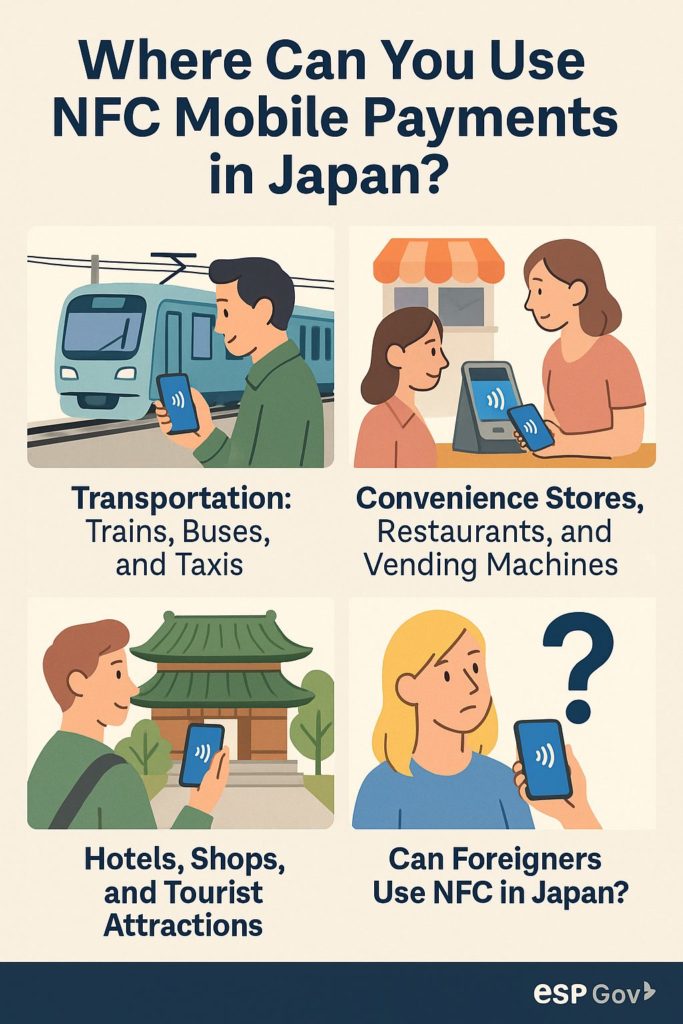
If you are visiting Japan, you’ll want to make things easy and fun. Using NFC mobile payment is one of the best ways to do that. Why? Because you can pay quickly without cash, and it works in many places. Let’s take a closer look at where you can use NFC payments across Japan, and why it’s great for travelers.
Transportation: Trains, Buses, and Taxis
You can use NFC mobile payments for almost all types of transportation in Japan, including trains, buses, and even taxis.
This makes your travel smoother because you don’t need to stop and buy a ticket each time. You just tap and go!
Let’s say you have a Suica or PASMO card on your phone. You can tap your iPhone or Android phone at the gate, and the train opens for you. No coins, no paper tickets. Buses are the same. Just tap your phone when you get on, and tap again when you get off. Some taxis now also have NFC readers—just tap to pay when you arrive.
Even better, you don’t need a Japanese bank account. If you have a phone with Apple Pay, Google Pay, or another wallet, you can often load Suica or PASMO cards with a foreign credit card.
In short, using NFC makes traveling around Japan much faster and less stressful.
Convenience Stores, Restaurants, and Vending Machines
You can also use NFC payments in everyday places like stores, restaurants, and even vending machines.
Japan is full of convenience stores (like 7-Eleven, Lawson, and FamilyMart). These stores sell everything from snacks to umbrellas. Almost all of them accept NFC payment. You just tap your phone and you’re done.
Imagine it’s raining and you run into a 7-Eleven. You grab an umbrella and a drink. No need to count coins—just tap your phone at the register. Easy, right?
Restaurants often accept NFC too. From ramen shops to sushi places, many have signs showing NFC logos like Suica, iD, QUICPay, or credit card icons. Some fast-food places like McDonald’s and Starbucks also take it.
And what about vending machines? Japan has over 4 million of them! Many now let you pay with your phone using NFC. Just look for the little contactless symbol and tap.
This means you can grab food or drinks anytime—no coins needed.
Hotels, Shops, and Tourist Attractions
You can use NFC payments at many hotels, shops, and sightseeing spots in Japan.
This helps you enjoy your trip without carrying a lot of money. It’s safer and quicker.
Many hotels, especially big chains or those in cities like Tokyo, Kyoto, or Osaka, accept Apple Pay, Google Pay, or contactless credit cards. When you check in or out, just tap your phone.
Shops also love NFC. Whether you’re buying clothes in a department store or gifts in a small souvenir shop, you’ll often see the NFC sign at the counter. Some stores also give points or discounts for using contactless payment.
And what about famous places like temples, museums, or theme parks? Many are catching up with technology. Places like Tokyo Skytree, teamLab, or even Kyoto’s bus tours accept NFC. This helps you skip lines and focus on fun.
From sleeping to shopping to sightseeing, NFC is your travel friend in Japan.
Can Foreigners Use NFC in Japan?
Yes, foreigners can use NFC mobile payments in Japan—even without a Japanese phone or bank account.
Many systems work with international credit cards and foreign phones.
If you’re using an iPhone with Apple Pay or an Android phone with Google Wallet, you can download apps like “Suica” or “PASMO” and add a virtual card. Then, you can charge it with your foreign Visa or Mastercard. Even if you use a physical contactless card from abroad, it may work at places that accept Visa tap or Mastercard PayPass.
Some credit cards also support iD or QUICPay, which are common in Japan. It’s good to check your bank or card company before coming.
One tip: not all machines or stores accept foreign cards. So always have a little cash just in case. But in most city areas, NFC works great.
So yes—foreign visitors can enjoy cashless travel in Japan using just their phones.
Tips to Stay Safe While Using NFC Payments
Is NFC Really Safe? Security Basics
Yes, NFC (Near Field Communication) is generally very safe. It’s used all over the world because it offers a fast, easy, and secure way to pay with your phone. But like any technology, it’s good to know how it works and what to watch out for.
NFC works only when your phone is very close—usually less than 4 centimeters—to a payment reader. That makes it hard for someone to “steal” your information from far away. Also, every time you pay with NFC, your phone uses a special code instead of your real credit card number. This is called tokenization. It means even if someone were to “listen in” on your transaction, they wouldn’t get your real payment details.
In addition, many phones require extra security before you can use NFC. You may need to unlock your phone with a fingerprint, face ID, or passcode. This adds another layer of protection, making it harder for someone else to use your phone if it’s lost or stolen.
Let’s say you’re at a store in Tokyo and pay with your iPhone. You hold it near the reader, and Face ID scans your face. Then the phone sends a secure, one-time code—not your actual credit card info—to complete the payment. Even if a hacker could see that code, it wouldn’t help them, because it works only once and only for that one store.
So yes, NFC is built to be very safe. But there are still some smart habits that can help you stay extra secure. Let’s go over a few more safety tips.
How to Avoid Skimming and Fraud
Although NFC is secure, it’s still smart to be careful. Scammers sometimes try to steal information using small tricks. By learning these tricks, you can protect yourself and enjoy mobile payments with peace of mind.
One danger is skimming. This is when a scammer puts a fake payment reader over a real one. If you tap your phone, it may look like you paid the store, but the scammer is actually stealing your payment info.
Another risk is using public Wi-Fi while paying with apps. Public Wi-Fi is not always safe. Hackers can “listen in” and try to grab your information while it’s being sent.
Some fake apps also try to trick you. They may look like real payment apps, but they’re designed to steal your details. That’s why it’s important to only download apps from trusted stores, like the App Store or Google Play.
Let’s say you’re using free Wi-Fi at a coffee shop. You open a payment app and try to buy something online. If a hacker is nearby, they might be able to see what you’re doing. To avoid this, always use your mobile data or a trusted Wi-Fi network when paying.
Also, imagine going to a convenience store where the payment reader looks odd or broken. If something feels wrong, trust your gut and don’t use it. Ask the staff for another machine or use cash instead.
To avoid fraud, stay alert. Don’t use shady machines, avoid unknown Wi-Fi, and download apps only from official stores.
What to Do If Your Phone Is Lost or Stolen
Losing your phone can be scary, especially if it has your payment info. But don’t panic. There are steps you can take to protect yourself and your money.
Most phones let you lock them or erase the data remotely. If you use iPhone, you can go to iCloud.com and mark your phone as “Lost.” This stops others from using your phone—even if they have it in their hands. Android phones have a similar tool called Find My Device.
Also, your payment apps (like Apple Pay or Google Pay) can be turned off remotely. That means no one can buy things using your phone if it goes missing.
It’s also smart to call your bank or card company right away. They can freeze your cards or help you set up new ones. Many credit card companies offer fraud protection, so you won’t have to pay for purchases you didn’t make.
Imagine you’re traveling in Kyoto, and you realize your phone is gone. You quickly borrow a friend’s phone, log into your iCloud account, and mark your device as lost. The phone gets locked, and you also pause Apple Pay. Then you call your credit card company just to be extra safe. This way, you stop any fraud before it happens.
If your phone gets lost or stolen, act fast. Use remote tools, contact your bank, and stay calm—you can still stay safe.
Summary: Which NFC Payment Type Is Best for You?
Comparing the Top 5 NFC Options
When choosing an NFC mobile payment type, it’s important to understand what each one offers. Let’s break down the five major types and see how they stack up against each other:
Apple Pay is perfect for iPhone users. It’s simple, safe, and widely accepted across Japan, especially in big cities. You can connect it with Suica or PASMO, which makes it great for trains and buses. It also works in convenience stores, vending machines, and restaurants. If you’re already used to using Apple Pay at home, you’ll find it familiar and easy here.
Google Pay is the go-to choice for Android users. It works with a wide range of phones and can also be linked to Suica and PASMO for smooth travel in Japan. Google Pay is secure, fast, and growing in popularity. It’s especially helpful for those who prefer using Android over iPhone.
Samsung Pay is popular with Galaxy phone users. It supports contactless payments, and in some countries, even works with magnetic stripe terminals. In Japan, however, it functions similarly to Google Pay. It’s best if you’re already a Samsung fan.
Suica and PASMO Mobile are must-haves for public transportation. These are prepaid IC cards that can be used with your phone via apps. They are widely accepted on trains, buses, and even in shops, making them very convenient. If you plan to move around cities like Tokyo or Kyoto, having Suica or PASMO on your phone is a game changer.
Credit Card-Based Contactless Payments like Visa Touch, Mastercard Contactless, and American Express Contactless are becoming more common. They don’t always need a local app—just your contactless card or an NFC-linked phone. They’re useful in tourist-friendly areas and large chains, but less so in smaller, cash-focused stores.
Each method has its strengths. Apple and Google Pay are excellent all-around tools. Suica and PASMO shine when it comes to transportation. Credit card-based systems offer a no-hassle approach if you don’t want to install extra apps.
What to Choose If You’re a Tourist
If you’re visiting Japan for a short time, you want something that works well, is easy to use, and doesn’t require too much setup. Here’s what we suggest:
- Short-term Visitors: Use Suica or PASMO Mobile. They help with trains, buses, and even small stores. You can charge them with cash or credit card, and the apps are available in English. If you’re using an iPhone, Apple Pay + Suica is a perfect combo.
- iPhone Users: Stick with Apple Pay. It’s fast, secure, and can hold a Suica or PASMO card. No need to carry physical cards or cash everywhere.
- Android Users: Go with Google Pay + Suica. This is just as smooth and convenient as Apple Pay. Just make sure your phone supports NFC and is set up for Japanese payments.
- Samsung Users: Samsung Pay works well but make sure your model is supported in Japan. If not, fall back to Google Pay or a Suica app.
- No Smartphone? If you don’t want to use your phone for payments, consider a physical Suica or PASMO card. You can buy and recharge them at stations. They’re very foreigner-friendly and easy to understand.
Tourists should always have a backup plan. Keep a little bit of cash just in case, especially if you’re going to rural areas or small shops. Also, download the needed apps before you come to Japan, while you still have stable internet.
Final Tips Before You Tap
Before you start using NFC mobile payments in Japan, here are some final helpful tips to keep things smooth and stress-free:
- Test Your Setup Before You Go Out: Try tapping your phone on a vending machine or convenience store reader. Make sure it works and is properly charged.
- Check for Signs: Look for signs like the Apple Pay, Google Pay, Suica, or Visa Contactless logos. If you’re not sure, just ask a store clerk: “Can I use contactless?” Many understand basic English.
- Watch Your Battery: Your phone needs power to use NFC. If your battery dies, so does your wallet! Carry a small portable charger with you.
- Use Wallet Apps Wisely: Some apps let you lock or freeze your cards. If your phone is lost, use this feature right away. It adds a strong layer of safety.
- Receipts and History: Many payment apps keep a list of past purchases. If you want to track your spending, check these after your shopping trips.
- Practice Safe Habits: Don’t tap your phone randomly. Be careful not to double-pay or tap without meaning to. Always look for confirmation on the screen or reader.
- Stay Updated: Apps often get updates with better language support or added features. Make sure your apps are current before traveling.
In conclusion, NFC mobile payments in Japan are fast, easy, and safe. Whether you’re shopping, riding a train, or getting a snack from a vending machine, tapping your phone is a modern, smooth way to go. With the right setup—Apple Pay, Google Pay, Suica, or even a simple contactless card—you’ll enjoy a worry-free trip filled with smart, touchless payments.